
YouTube Video Thumbnail Grid Layout
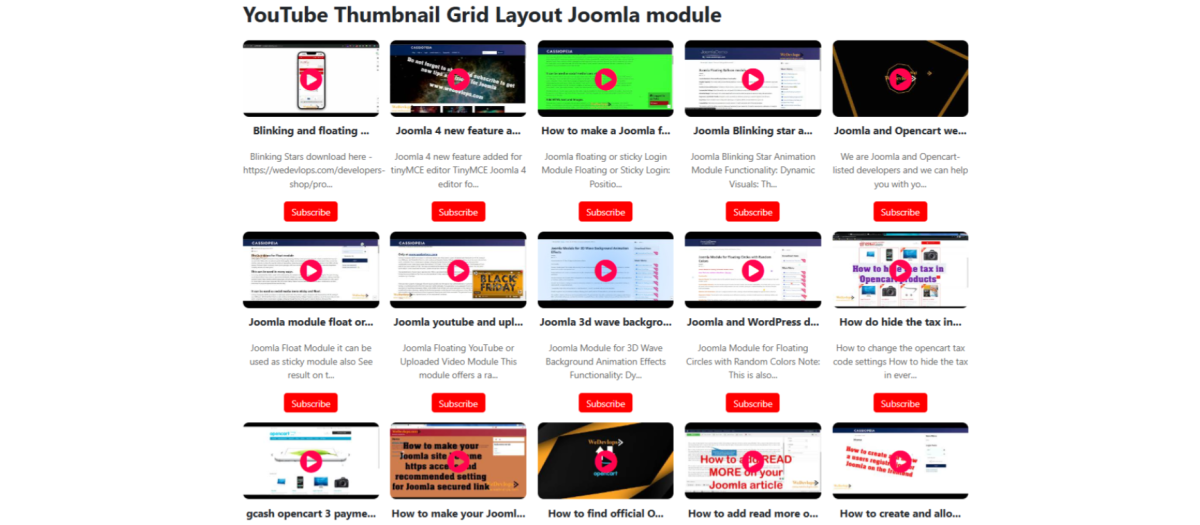
Function Overview:
YouTube Thumbnail Grid Layout Joomla module allows you to display YouTube thumbnails in a grid layout, which is both mobile-responsive and flexible. It provides various settings to customize the appearance and functionality of the YouTube thumbnails, making it easy to integrate and manage on your website.
Key Features:
?YouTube Channel ID: You can specify the YouTube Channel ID to fetch and display videos from a particular channel.
?YouTube API Key: The module requires a YouTube API key to access and retrieve video data from YouTube.
?Number of Videos: You can set the number of videos to be displayed in the grid layout (unlimited). Automatically synchronize to your YouTube Channels.
?Show Description: Option to show or hide the video descriptions below each thumbnail.
?Show Subscribe Button: Option to display a "Subscribe" button for the YouTube channel.
?Show Play Button: Option to show a play button overlay on the video thumbnails.
?Play Icon Color: Customize the color of the play button icon to match your website's theme.
?Play Icon Size: Adjust the size of the play button icon to fit your design preferences.
?Responsive Design: The module is designed to be fully responsive, ensuring that the grid layout adapts seamlessly to different screen sizes, including desktops, tablets, and smartphones.
?Flexible Settings: The module offers a range of customizable settings, allowing you to tailor the display of YouTube gives you an automatic layout for 5 videos, 10 videos, and more than 10 videos for grid thumbnail lay output.
?Easy Integration: The module is easy to install and configure. Once installed, you can access the settings through the Joomla backend and make adjustments as needed.
?Dynamic Content: The module dynamically fetches and displays the latest videos from the specified YouTube channel, ensuring the content is always up-to-date.
?Customization Options: You can create a cohesive look that matches your website's design. (Visit our demo site and test it for your self)
YouTube Video Thumbnail Grid Layout Joomla module lets you showcase YouTube thumbnails in a fully responsive, customizable grid design. With flexible settings for appearance and functionality, this Joomla extension makes it simple to integrate and manage YouTube video thumbnails on any website.
?STEP BY STEP VIDEO TUTORIAL?
??https://youtu.be/xQ4uxyRcojA
?In this example:?
??youtubechannelid specifies the ID of the YouTube channel.
??youtubeapikey is your YouTube API key.
??numberofvideos sets the number of videos to display.
??show_description toggles the display of video descriptions.
??showsubscribebutton toggles the display of the subscribe button.
??showplaybutton toggles the display of the play button.
??playiconcolor sets the color of the play button.
??playiconsize sets the size of the play button.
YouTube Thumbnail Grid Layout is a powerful tool for showcasing YouTube content on your Joomla website, providing both flexibility and ease of use.
YouTube Thumbnail Grid Layout
Extension Data :
- Compatibility :
- Joomla 3.xYes
- Joomla 4.xYes
- Joomla 5.xYes
- Joomla 6.xYes

