
BarrierFree
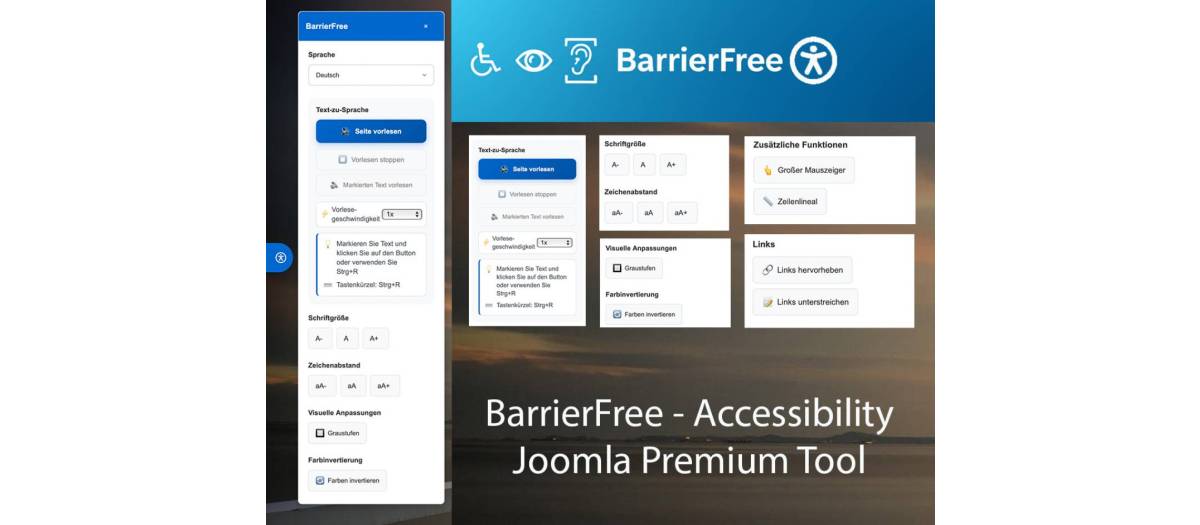
BarrierFree Joomla Plugin - Release Notes Version 2.1.2
? What's New in Version 2.1.2
? Custom Toolbar Colors
You can now customize the toolbar color to perfectly match your website design!
What does this mean for you?
- Choose from predefined color schemes (Blue, Green, Red, Orange, Purple)
- Or enter your own custom color using a color picker
- The "Read Page" button automatically adapts to your selected color
- Professional appearance that matches your corporate design
How to use:
1. Go to the plugin settings in the Joomla backend
2. Navigate to "Design Settings"
3. Select "Custom Color" under "Toolbar Color"
4. Choose your desired color with the color picker
5. Save - done!
? Improved Mobile Experience
The accessibility panel is now even more user-friendly on smartphones and tablets!
Improvements:
- Info texts are now automatically hidden on small screens
- More space for the actual functions
- Clearer and tidier display on mobile devices
- Better usability with touch gestures
?? Better Text Labeling
We've made the button labels clearer and more concise.
Changes:
- "Read Marked Text" is now "Read Selection"
- Shorter, clearer, easier to understand
- Available in German and English
- Faster recognition of the function
? Donation Button
Support the continued development of the plugin!
New:
- PayPal donation button integrated in the panel
- Quick and easy way to support the project
- Replaces the previous blog link
- Can be customized or disabled in the settings
How to customize:
1. Plugin settings ? "Advanced Settings"
2. "Show Button" - Enable/disable the button
3. "Custom Button URL" - Enter your own link
4. "Custom Button Text" - Change the button text
5. Save
? Premium Features Expanded
Hide Version Label (Premium Only)
Do you want a completely minimalist design? No problem!
New Premium Option:
- Hide version label in the panel
- Completely clean design
- Professional appearance without version numbers
- Only available for Premium users
How to activate:
1. Enter Premium Code in the plugin settings
2. Navigate to "Premium Features"
3. Disable "Show Version Label"
4. Save - the label disappears
Additional Premium Code
A new Premium Code has been added for activating all premium features.
? Settings & Configuration
Where do I find the new functions?
In the Joomla Backend:
1. Extensions ? Plugins
2. Search for "BarrierFree"
3. Click on the plugin
4. The new settings are in the following tabs:
- Design Settings - Toolbar colors
- Advanced Settings - Button configuration
- Premium Features - Premium functions (code required)
? Complete Feature List Version 2.1.2
Design & Customization
? Custom toolbar colors (color picker)
? "Read Page" button adapts to toolbar color
? Increased spacing in reading speed control
? Optimized display on mobile devices
User Experience
? "Read Selection" instead of "Read Marked Text"
? Info box hidden on mobile devices
? Donation button with PayPal integration
? Clearer button labels
Premium Features (Code Required)
? Hide version label
? Additional premium code available
? All text-to-speech functions
? Reading speed control
Technical
? Compatible with Joomla 4.x, 5.x, 6.x
? Improved CSS performance
? Updated language files (DE/EN)
? Bug fixes and optimizations
? Update Instructions
Automatic Update (Recommended)
- Joomla Backend ? Extensions ? Update
- Search for "BarrierFree"
- Click "Update"
- Done!
Manual Update
- Download the new version
- Extensions ? Install
- Upload ZIP file
- Install
- Clear Joomla cache
? Tips for Getting Started
For New Users:
- Activate the plugin in the backend
- Test the accessibility panel on your website
- Adjust colors to match your design
- Optionally enter a Premium Code for all features
For Existing Users:
- Update to version 2.1.2
- Check the new color options
- Customize the donation button if desired
- Test the mobile display
? Support & Help
Problems with the update?
- Clear the Joomla cache (System ? Clear Cache)
- Check if the plugin is enabled
- Review the plugin settings
Questions or suggestions?
- Visit our support page
- Or use the donation button to support the project
? System Requirements
- Joomla: 4.0 or higher (4.x, 5.x, 6.x)
- PHP: 7.4 or higher
- Browser: All modern browsers (Chrome, Firefox, Safari, Edge)
- Mobile: iOS 12+, Android 8+
? Thank You!
Thank you for using the BarrierFree plugin and helping make the web more accessible!
Want to support the project?
Use the new donation button in the accessibility panel or visit:
https://www.paypal.com/donate/?hostedbuttonid=ES7LBMM4RQJTS
Version: 2.1.2
Release Date: December 2025
License: GNU/GPL v2 or later
Author: BarrierFree Development Team
Release Date: December 2025 Version: 2.1.2 Compatibility: Joomla 4.x, 5.x, 6.x
Extension Data :
- Compatibility :
- Joomla 3.xYes
- Joomla 4.xYes
- Joomla 5.xYes
- Joomla 6.xYes

